使用 Three.js 实现 Midjourney 首页动画
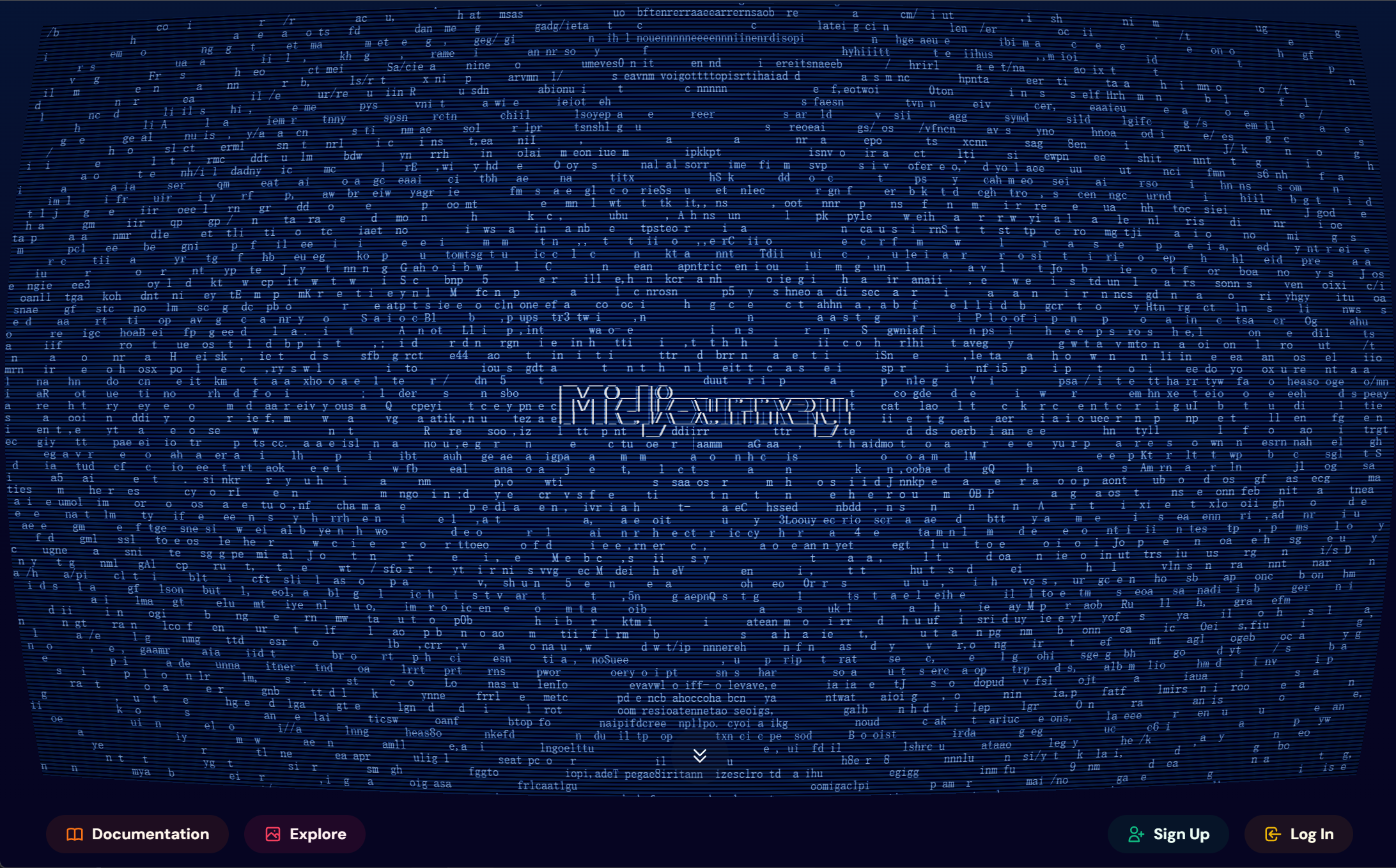
在 cursor 帮助下,两个小时使用 three.js 完美实现这个动画。
1. 背景
周五的时候,领导看到了 Midjourney 官网的首页动画,然后说这个动画挺有意思的,挺炫酷,然后就让我看看是怎么实现的。
我当时就觉得,应该也是 three.js 实现的,看起来 shader 比较复杂,但是这个应该能从官网上爬下来,正好也是个机会,逆向学习一下。
2. 思路
首先,我就是下意识的想法,这个动画效果离不开 shader 的,因为这个滤镜效果,比较不赖。 其次,就是这个 shader 应该能从网站上爬下来。 再者,我打算使用 three.js 实现这个动画效果。(因为虽然我对 three.js 并没有那么熟手,但是还是有所了解的,纯纯路径依赖了😂。)
接下来,我就开始付诸行动。
3. 爬取代码
既然自己觉得这个离不开 shader,那么就先从 shader 入手。
3.1 找到 shader 代码
先筛选出 JS 文件,然后看到数量不多,那就直接简单粗暴的,每个文件都 Ctrl+F 一下,查看一下 glsl 代码的关键字 uniform。
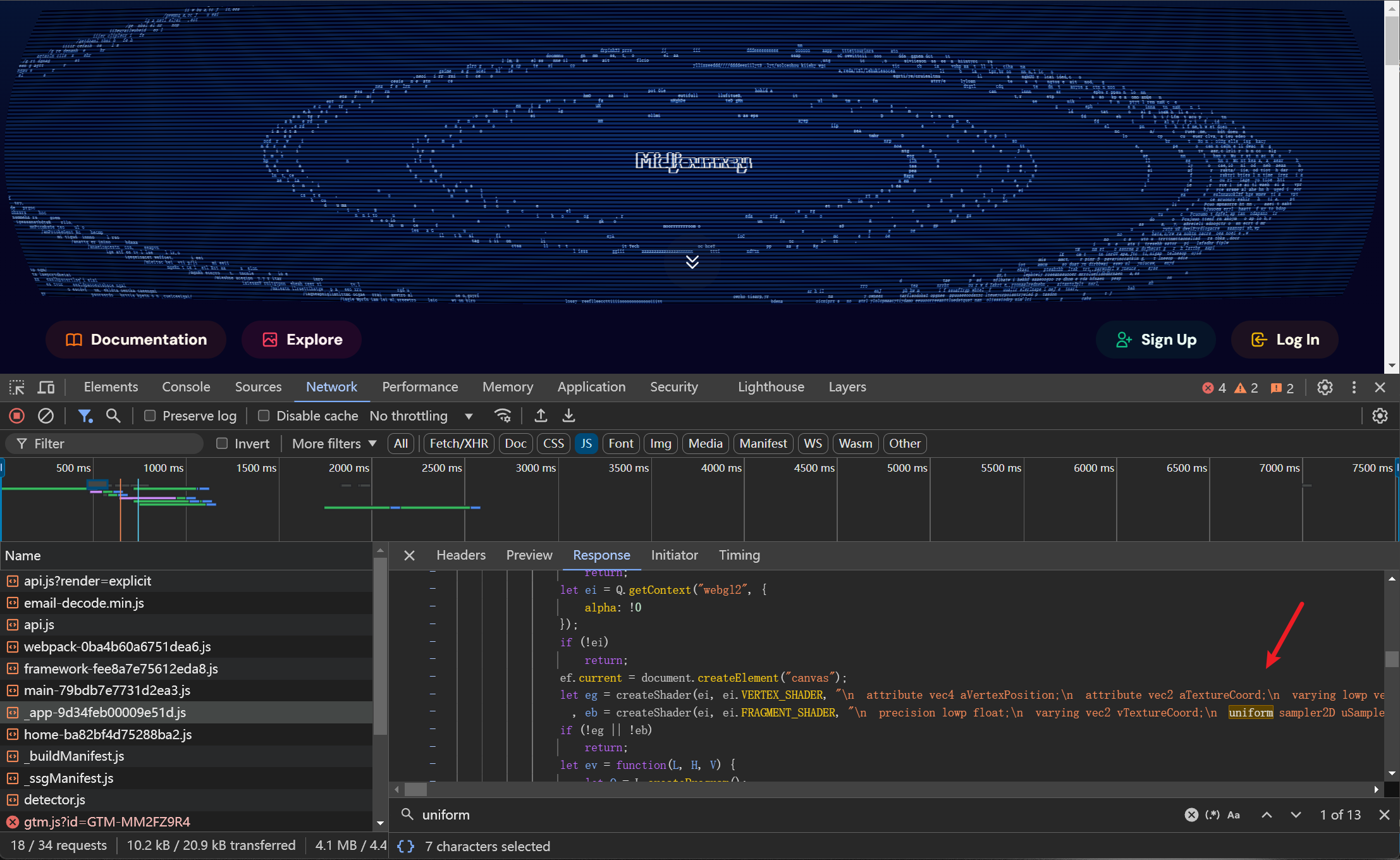
很顺利,只在一个文件中找到了 uniform 关键字,而且很明显的,这里的代码就是我们要找的 shader 代码。
3.2 复制代码
找到了代码,现在就是准备复制代码。 首先第一步,这个包裹着 glsl 代码的函数是我们需要的代码。但是只复制这个函数,行不行,还是未知数,说不定会引到了其他代码。
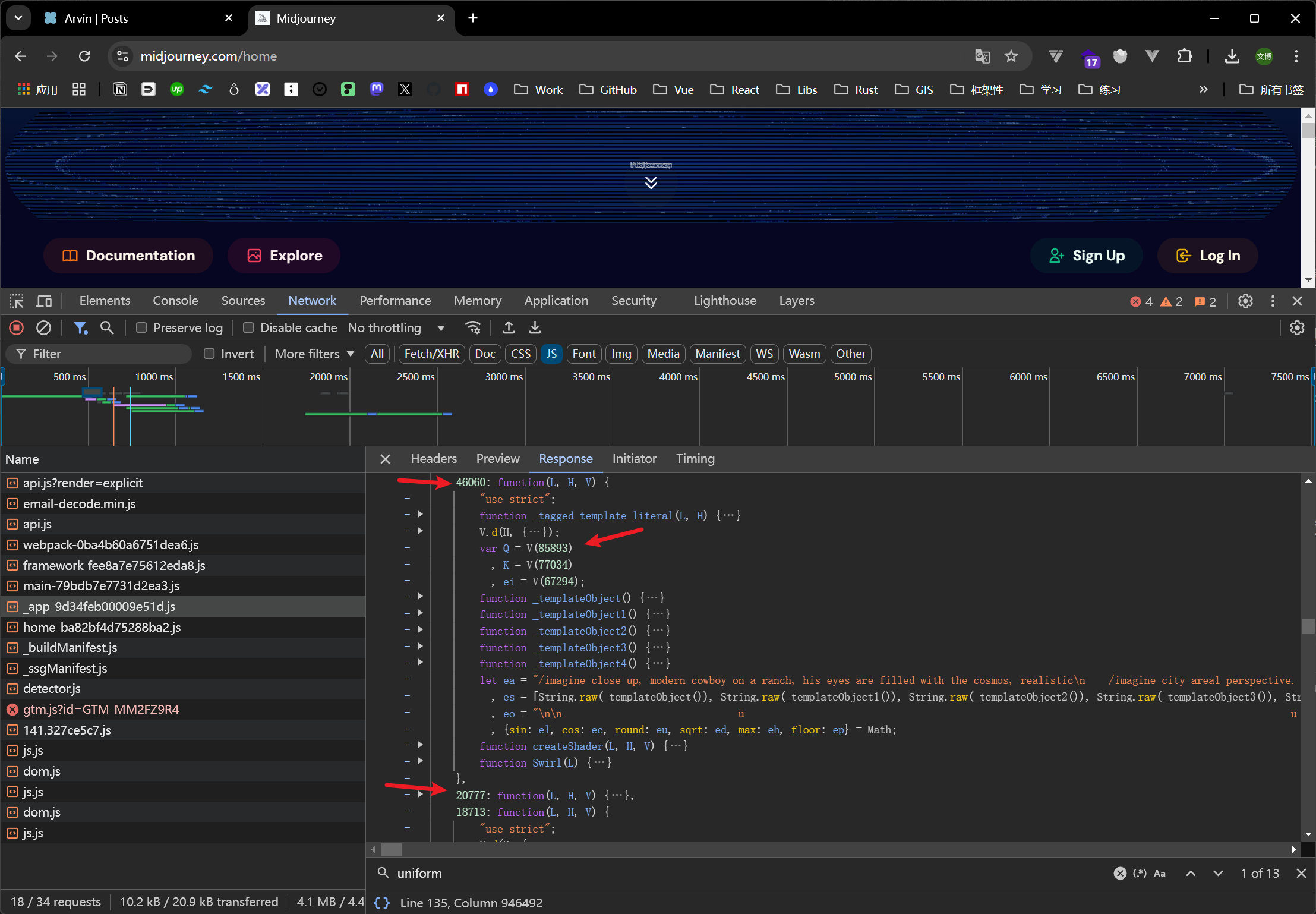
这里我们观察一下,发现这个函数其实就只引用了外部的这三个数字的方法。而通过经验可知,这三个数字其实就是 webpack 为每个模块分配的唯一标识符。
那么我们其实就放心的先拷贝这个包裹 glsl 代码的函数,再拷贝这三个数字的方法。
然后可能还需要观察,那另外的三个方法是否有引入其他部分的代码。
不过其实对于一般的这种 shader 代码实现的页面效果,不会像业务复杂的逻辑代码那样,耦合很多别的地方的代码,一般也就是一些数学 utils 方法。
那么我们其实也能顺利地拷贝了代码,如下:
function(L, H, V) {
"use strict";
function center(L, H) {
let V = arguments.length > 2 && void 0 !== arguments[2] ? arguments[2] : 0
, Q = arguments.length > 3 && void 0 !== arguments[3] ? arguments[3] : 0;
return V + (H - V - Q - L) / 2
}
function remap(L, H, V, Q, K) {
return H === V ? (Q + K) / 2 : (L - H) / (V - H) * (K - Q) + Q
}
function lessEqual(L, H, V) {
return L <= H && H <= V
}
function overlapInclusive(L, H, V, Q, K, ei, ea, es) {
return L <= K + ea && K <= L + V && H <= ei + es && ei <= H + Q
}
function fit(L, H, V) {
return Math.min(H, V * L)
}
function clamp(L, H, V) {
return H > V ? V : H < L ? L : H
}
function easeOutQuad(L) {
return 1 - (1 - L) ** 2
}
function mix(L, H, V) {
return L * (1 - V) + H * V
}
function rem(L) {
return 16 * L
}
function fract(L) {
return L - Math.floor(L)
}
V.d(H, {
CD: function() {
return mix
},
OG: function() {
return overlapInclusive
},
Tj: function() {
return fit
},
ZI: function() {
return fract
},
a2: function() {
return remap
},
be: function() {
return center
},
hO: function() {
return rem
},
hl: function() {
return easeOutQuad
},
uZ: function() {
return clamp
},
zN: function() {
return lessEqual
}
})
}
function(L, H, V) {
"use strict";
function _tagged_template_literal(L, H) {
return H || (H = L.slice(0)),
Object.freeze(Object.defineProperties(L, {
raw: {
value: Object.freeze(H)
}
}))
}
V.d(H, {
ZP: function() {
return Swirl
}
});
var Q = V(85893)
, K = V(77034)
, ei = V(67294);
function _templateObject() {
let L = _tagged_template_literal([" __ __ _ _ _ "]);
return _templateObject = function() {
return L
}
,
L
}
function _templateObject1() {
let L = _tagged_template_literal(["| / (_)__| |(_)___ _ _ _ _ _ _ ___ _ _ "], ["| \\/ (_)__| |(_)___ _ _ _ _ _ _ ___ _ _ "]);
return _templateObject1 = function() {
return L
}
,
L
}
function _templateObject2() {
let L = _tagged_template_literal(["| |/| | / _| || / _ || | '_| ' / -_) || |"], ["| |\\/| | / _| || / _ \\ || | '_| ' \\/ -_) || |"]);
return _templateObject2 = function() {
return L
}
,
L
}
function _templateObject3() {
let L = _tagged_template_literal(["|_| |_|___,_|/ ___/_,_|_| |_||____|_, |"], ["|_| |_|_\\__,_|/ \\___/\\_,_|_| |_||_\\___|\\_, |"]);
return _templateObject3 = function() {
return L
}
,
L
}
function _templateObject4() {
let L = _tagged_template_literal([" |__/ |__/ "]);
return _templateObject4 = function() {
return L
}
,
L
}
let ea = "/imagine close up, modern cowboy on a ranch, his eyes are filled with the cosmos, realistic\n /imagine city areal perspective. streets glowing, concrete architecture, green roofs, people on the streets\n /imagine the beginning of the universe by Monet\n /imagine looking up a never ending staircase by Jean Giraud Moebius\n /imagine abstract, cycle, organic, powerful, behance\n /imagine gorgeous bouquet still life painting in the style of Odilon Redon and Henri Fantin-Latour\n /imagine a warm sunny beach near an ocean full of pikachu's\n /imagine 3d render of gold rings, geometric, circles, triangles, psychedelic, infinity pool, eccojams, vaporwave, oneohtrix point never, golden hour, glossy reflections and light rays, portals into other worlds\n /imagine intricate jungle landscape by albrecht durer, henri rousseau, pieter brueghel the elder, mattisse\n /imagine cyberpunk cat rabbit hacker, googles, anime style\n /imagine banana with glasses dancing, ghibli style\n /imagine corgis dancing in vibrant victorian dresses, Rococo style, in a large luxurious ballroom\n /imagine A wise/meditating/fantasy wizard sitting in complex/intricate meadow with mountains/fields, painted by Japanese artist Koji Miromoto using detailed/hyperfine/lineart/print black paper ink techniques and exotic glowy psychedelic ink, autochrome colors/style. Stylized/detailed/textured, gradients, graduated colors, fine line details.\n /imagine 1960s illustration of the beginning of life on Earth\n /imagine commodore 1351 mouse. 80s sythwave style. hyper realistic\n /imagine map of steampunk desert\n /imagine francisco goya scene oil painting watercolor sci-fi science fiction cyberpunk time machine\n /imagine Portrait of a cyber glitch sorceress causing video corruption with her magic\n /imagine a realistic ancient temple, crumbling stone, vines, extreme detail, statues, octane render, volumetric fog, realistic lighting, reflections\n /imagine giant red crystals in a desert with two suns\n /imagine Robin Williams in the style of John Allison\n /imagine standing in front of a castle\n /imagine a professional photorealistic Portrait of an Astronaut by Peter Mohrbacher,Shaun Tan and Seb McKinnon,realistic eyes,realistic hair,,Beautiful Hit Tech costume and Helmet details,Beautiful dramatic dark moody lighting,Cinematographic Atmosphere,photorealism glossy magazine painting,Octane Render,Deep Color,8k Resolution,High Details,Flickr,DSLR,CGsociety,Artstation\n /imagine Matter condensed from energy, life built upon matter, consciousness upon life\n /imagine hyperreal swirling watercolors trapped in a soap bubble, 4k render\n /imagine beautiful painting of clouds with sunrise, by john martin, Trending on artstation, pastel aesthetic\n /imagine modern futuristic lampshade with art nouveau inspiration\n /imagine photo shot on Leica IIIf with 50mm f/2 Summar; 1/50 sec; f/4\n /imagine sharp alphabet typography by Walter Gropius\n /imagine four dogs playing poker in a crowded room, by Malcolm Liepke and Lovis Corinth, oilpainting\n /imagine invitation made with old paper written with cursive font pyrographic words in the center | red wax seal above in the top-left corner, cinematic light, artstation\n /imagine aisle view of the festival street market in AlUla, many booths, seating areas, natural materials, cinematic shot\n /imagine japanese temple, sakura, detailed oil painting, by Mateusz Urbanowicz\n /imagine a stegosaurus drawn by John Singer Sargent\n /imagine a mysterious forest with many fireflies, trees with large roots covered in moss, green vegetation, Studio Ghibli animation style, Japanese animation film background,\n /imagine the universe in our ancestors eyes\n /imagine The inside of a gothic cathedral that looks like a tropical alien utopian jungle rainforest, dramatic cinematic lighting\n /imagine A hero stands alone, artstation, highly detailed, cinematic\n /imagine symmetric texture repetition on a tree on a beautiful mountain landscape\n /imagine midcentury luchador mask, risograph\n /imagine ultra detailed line drawing, black and white and red, pen and ink, high tech cyberpunk geisha with headphones and sunglasses and VR goggles in style of Shohei Otomo\n /imagine interior of master bedroom in victorian mansion, window, dan mindel cinematography, 35mm, movie scene, pitch black, realistic lighting, perspective shots, moody atmosphere, light coming from outside, HDRI\n /imagine the alien robot queen holding a party at the dome castle in HQ Cloud City during a technicolor sunset\n /imagine corporate memphis style, mural, pride month, white background, vector, characters waving pride flags, celebration\n /imagine abstract painting of coral reef\n /imagine a calico cat taking a nap on a kiwi\n /imagine Dreamy landscape depiction inspired by the works of Katsushika Hokusai, trending on artstation\n /imagine garden bridge over swan pond monet garden lillies and hanging trees art\n /imagine green dragon roosting above its lair in the ruins of a fantasy medieval city\n /imagine rainwater flowing through a complex system of ancient stone pipes and a gargoyle watching\n /imagine butterflies flit in a sunlit field. Hiroshige Japanese woodblock print.\n /imagine hourglass heart, liquid, grand canyon background, fleeting, ephemerality of time\n /imagine miniature watermelon delicately balanced on fingertip\n /imagine a phone held extremely close against an xray of a skeleton sitting on a sofa, side by side view\n /imagine eclipse in a tiny keychain bottle, dangling around a walking woman's purse, dynamic pose, macro photography\n /imagine peaceful prehistoric marine lagaxy life, adventure, bold outlines, bold colors, psychedelic swirls patterns\n /imagine kid's back, low angle, staring up at mobius spaceship landing in ancient china\n /imagine Jupiter sitting on a chair on Saturn\n /imagine marble sculpture of an orange, museum gallery, exhibit\n /imagine dancing female astronaut exploring a floating food planet, bold colors, bold outlines, tshirt design\n /imagine dead tree and castle shaped like the silhouette of a skull, negative space\n /imagine cute little acorn doll with glasses in the forest, tilt shift, intricate details, 8k, photoshoot, contrast, studio lighting\n /imagine dolphin submarine pod flying in space, saturn background, bold outlines\n /imagine zebra strips manga portraits\n /imagine an illustration of a wooden magic wand with an aura of void around it, stars glitter subtly around it, closeup, fantasy card game art trending on artstation concept art by Jason Chan".split("\n").map(L => L.replace(/\t/g, " "))
, es = [String.raw(_templateObject()), String.raw(_templateObject1()), String.raw(_templateObject2()), String.raw(_templateObject3()), String.raw(_templateObject4())]
, eo = "\-n\n u u y y\n\n\n e e\n\n n n j j\n\n\n\n q q k k\n\n\n\n k k h h\n\n\n\n\n\n\n f f\n\n\n u u y y\n\n\n\n\n n n d ld l\n\n\n\n a n a n\n\n\n c c\n\n\n\n\n\n x n w g x n w g\n\n\n\n z z\n\n\n\n".split("\n").map(L => L.replace(/\t/g, " "))
, {sin: el, cos: ec, round: eu, sqrt: ed, max: eh, floor: ep} = Math;
function createShader(L, H, V) {
let Q = L.createShader(H);
if (!Q)
throw Error("Failed to create shader");
return (L.shaderSource(Q, V),
L.compileShader(Q),
!1 === L.getShaderParameter(Q, L.COMPILE_STATUS)) ? (L.deleteShader(Q),
null) : Q
}
function Swirl(L) {
let {sparse: H} = L
, V = (0,
ei.useRef)(null)
, ef = (0,
ei.useRef)(null)
, em = (0,
ei.useRef)(0);
return (0,
ei.useEffect)( () => {
let L;
let Q = V.current;
if (!Q)
return;
let ei = Q.getContext("webgl2", {
alpha: !0
});
if (!ei)
return;
ef.current = document.createElement("canvas");
let eg = createShader(ei, ei.VERTEX_SHADER, "\n attribute vec4 aVertexPosition;\n attribute vec2 aTextureCoord;\n varying lowp vec2 vTextureCoord;\n void main(void) {\n gl_Position = aVertexPosition;\n vTextureCoord = aTextureCoord;\n }\n")
, eb = createShader(ei, ei.FRAGMENT_SHADER, "\n precision lowp float;\n varying vec2 vTextureCoord;\n uniform sampler2D uSampler;\n uniform float uTime;\n uniform vec2 uResolution;\n\n float easeOutQuad(float t) { return t * (2.0 - t); }\n\n void main() {\n vec2 uv = vTextureCoord;\n\n // Calculate curvature amount with ease-out\n float curvatureDuration = 3000.0;\n float curvatureProgress = min(uTime / curvatureDuration, 1.0);\n float curvatureAmount = easeOutQuad(curvatureProgress);\n\n // CRT curvature with transition\n vec2 curved_uv = uv * 2.0 - 1.0;\n curved_uv *= 1.0 + (0.1 * curvatureAmount);\n curved_uv *= 1.0 - (0.085 * curvatureAmount) + (0.05 * curvatureAmount) * pow(abs(curved_uv.yx), vec2(2.0));\n curved_uv = (curved_uv * 0.5 + 0.5);\n\n // Check if the pixel is outside the curved area\n if (curved_uv.x < 0.0 || curved_uv.x > 1.0 || curved_uv.y < 0.0 || curved_uv.y > 1.0) {\n gl_FragColor = vec4(0.0, 0.0, 0.0, 0.0); // Transparent\n return;\n }\n\n // Chroma shift with exponential decay\n float decay = .005*exp(-uTime / 1500.);\n float r = texture2D(uSampler, vec2(curved_uv.x + decay, curved_uv.y)).r;\n float g = texture2D(uSampler, curved_uv).g;\n float b = texture2D(uSampler, vec2(curved_uv.x - decay, curved_uv.y)).b;\n\n vec4 texColor = vec4(r, g, b, 1.0);\n\n // Updated scanlines effect with movement (subtractive)\n float scanline_speed = 0.0000005;\n float scanline = max(0.0, sin((curved_uv.y + uTime * scanline_speed) * uResolution.y * 1.0)) * 0.5;\n float scanline_opacity = 0.4;\n texColor.rgb = mix(texColor.rgb, texColor.rgb - vec3(scanline), scanline_opacity);\n\n // Vignette effect\n float vignette = 1.0 - length(curved_uv - 0.5) * .7;\n texColor.rgb *= vignette;\n\n // Overall brightness boost\n texColor.rgb *= 2.5;\n\n // Soft clipping to prevent over-saturation\n texColor.rgb = 1.0 - exp(-texColor.rgb);\n\n gl_FragColor = texColor;\n }\n");
if (!eg || !eb)
return;
let ev = function(L, H, V) {
let Q = L.createProgram();
if (!Q)
throw Error("Failed to create program");
return (L.attachShader(Q, H),
L.attachShader(Q, V),
L.linkProgram(Q),
!1 === L.getProgramParameter(Q, L.LINK_STATUS)) ? null : Q
}(ei, eg, eb);
if (!ev)
return;
let ey = {
program: ev,
attribLocations: {
vertexPosition: ei.getAttribLocation(ev, "aVertexPosition"),
textureCoord: ei.getAttribLocation(ev, "aTextureCoord")
},
uniformLocations: {
uSampler: ei.getUniformLocation(ev, "uSampler"),
uTime: ei.getUniformLocation(ev, "uTime"),
uResolution: ei.getUniformLocation(ev, "uResolution")
}
}
, ex = ei.createBuffer();
ei.bindBuffer(ei.ARRAY_BUFFER, ex),
ei.bufferData(ei.ARRAY_BUFFER, new Float32Array([-1, 1, 1, 1, -1, -1, 1, -1]), ei.STATIC_DRAW);
let ew = ei.createBuffer();
ei.bindBuffer(ei.ARRAY_BUFFER, ew),
ei.bufferData(ei.ARRAY_BUFFER, new Float32Array([0, 0, 1, 0, 0, 1, 1, 1]), ei.STATIC_DRAW);
let ek = ei.createTexture();
return ei.bindTexture(ei.TEXTURE_2D, ek),
ei.texParameteri(ei.TEXTURE_2D, ei.TEXTURE_WRAP_S, ei.CLAMP_TO_EDGE),
ei.texParameteri(ei.TEXTURE_2D, ei.TEXTURE_WRAP_T, ei.CLAMP_TO_EDGE),
ei.texParameteri(ei.TEXTURE_2D, ei.TEXTURE_MIN_FILTER, ei.LINEAR),
ei.texParameteri(ei.TEXTURE_2D, ei.TEXTURE_MAG_FILTER, ei.LINEAR),
function animate(Q) {
let ei = ef.current;
if (!ei)
return;
let eg = V.current;
if (!eg)
return;
let eb = eg.getContext("webgl2", {
alpha: !0
});
if (!eb)
return;
let ev = eg.getBoundingClientRect()
, eC = ev.width
, ej = ev.height
, e_ = window.devicePixelRatio || 1;
0 === em.current && (em.current = Q);
let eS = Q - em.current;
!function(L, H, V, Q, ei, ef) {
let em = L.getContext("2d");
if (!em)
return;
let eg = ef ? 1e-4 * ei : .001 * ei
, eb = (0,
K.hl)((0,
K.uZ)(0, (.001 * ei - 1) * .5, 1))
, ev = V * H
, ey = Q * H;
L.width = ev,
L.height = ey,
L.style.width = "".concat(V, "px"),
L.style.height = "".concat(Q, "px");
let ex = ef ? eo : ea
, ew = ex.length;
em.fillStyle = "#061434",
em.fillRect(0, 0, ev, ey);
let ek = Math.ceil(ey / ew);
em.font = "".concat(ek, "px monospace");
let eC = em.measureText("M").width
, ej = ep(ev / eC)
, e_ = eh(0, eu((ej - es[0].length) / 2))
, eS = eu((ew - es.length) / 2);
for (let L = 0; L < ew; L++) {
let H = ""
, V = ""
, Q = 1 - 2 * L / ew;
for (let ei = 0; ei < ej; ei++) {
var eA, eE;
let ea = 2 * ei / ej - 1
, eo = ed(ea * ea + Q * Q)
, ef = .1 * eg / eh(.1, eo)
, em = el(ef)
, ev = ec(ef)
, ey = ea * ev + Q * em
, ek = ea * em - Q * ev
, eC = ep((ey + 1) / 2 * ej)
, eI = ep((ek + 1) / 2 * ex.length) % ex.length
, eN = eC < 0 || eC >= ej || eI < 0 || eI >= ew
, eT = eN ? " " : null !== (eA = ex[eI][eC]) && void 0 !== eA ? eA : " "
, eP = L >= eS && L < eS + es.length && ei >= e_ && ei < e_ + es[0].length;
if (eP) {
let H = ei - e_
, Q = L - eS
, ea = null !== (eE = es[Q][H]) && void 0 !== eE ? eE : eT
, eo = " " !== ea || H > 0 && " " !== es[Q][H - 1] || H < es[0].length - 1 && " " !== es[Q][H + 1];
if (eo) {
let L = eT.charCodeAt(0)
, H = ea.charCodeAt(0);
V += eT = String.fromCharCode(eu((0,
K.CD)(L, H, eb)))
} else
V += " "
}
H += eT
}
em.fillStyle = "hsl(220, 80%, 70%)",
em.font = "".concat(ek, "px monospace"),
em.fillText(H, 0, L * ek),
L >= eS && L < eS + es.length && (em.fillStyle = "rgba(255, 255, 255, ".concat(eb, ")"),
em.font = "bold ".concat(ek, "px monospace"),
em.fillText(V, e_ * eC, L * ek))
}
}(ei, e_, eC, ej, eS, H);
let eA = eC * e_
, eE = ej * e_;
eg.width = eA,
eg.height = eE,
eb.viewport(0, 0, eA, eE),
eb.clearColor(0, 0, 0, 0),
eb.clear(eb.COLOR_BUFFER_BIT),
eb.enable(eb.BLEND),
eb.blendFunc(eb.SRC_ALPHA, eb.ONE_MINUS_SRC_ALPHA),
eb.bindTexture(eb.TEXTURE_2D, ek),
eb.texImage2D(eb.TEXTURE_2D, 0, eb.RGBA, eb.RGBA, eb.UNSIGNED_BYTE, ei),
eb.useProgram(ey.program),
eb.bindBuffer(eb.ARRAY_BUFFER, ex),
eb.vertexAttribPointer(ey.attribLocations.vertexPosition, 2, eb.FLOAT, !1, 0, 0),
eb.enableVertexAttribArray(ey.attribLocations.vertexPosition),
eb.bindBuffer(eb.ARRAY_BUFFER, ew),
eb.vertexAttribPointer(ey.attribLocations.textureCoord, 2, eb.FLOAT, !1, 0, 0),
eb.enableVertexAttribArray(ey.attribLocations.textureCoord),
eb.uniform1i(ey.uniformLocations.uSampler, 0),
eb.uniform1f(ey.uniformLocations.uTime, eS),
eb.uniform2f(ey.uniformLocations.uResolution, eA, eE),
eb.drawArrays(eb.TRIANGLE_STRIP, 0, 4),
L = requestAnimationFrame(animate)
}(performance.now()),
() => {
cancelAnimationFrame(L),
ei.deleteTexture(ek),
ei.deleteProgram(ev),
ei.deleteShader(eg),
ei.deleteShader(eb)
}
}
, [H]),
(0,
Q.jsx)("canvas", {
ref: V,
style: {
width: "100%",
height: "100%",
background: "transparent"
}
})
}
}
3.3 分析代码
其实我们光看这个丑化后的代码,也是能看出一些端倪的,因为这个代码量并不多。 首先 attachShader 和 linkProgram 一看就知道, webGL2 了。再看 uniform 的变量,并没有太多,那其实就感觉非常顺利了,最头疼的就是着色器中引入了太多的乱七八糟的变量了。这里很简洁,只能说代码质量够高。
其实上面就可以知道,这个代码其实就是一个 shader 的滤镜,然后文字的动画要么是个视频,要么就是个 js 的动画。
3.4 寻求 cursor 帮助
我直接使用 cursor ,模型还是 claude 3.5 sonnet,目前来说,非常好用。
直接将上面拷贝的代码喂给它,然后让其帮我分析一下。
然后我得到了 CRT effect 这个答案,原来 Midjourney 首页的动画其实就是 CRT 效果。还是有文化隔阂,见识不够,google 了一下,发现这个就是旧显示器的效果,而且在设计界挺流行的。又涨知识了,下次见到应该会有印象。
如果早知道这个,我可能的代码思路就是,svg 或者 three.js 做一个 CRT 的滤镜,然后下面放一个视频,随便什么动画,视频实现得了。
不过这里 CRT 特效既然是个很通俗的效果了,那么直接生成代码,应该不成问题。
我直接问 cursor ,"参考这个代码,使用 three.js 和 react 实现一个 CRT 滤镜。"
然后我得到了一个非常简洁的代码,如下:
          import { useEffect, useRef } from 'react';
import * as THREE from 'three';

const FRAGMENT_SHADER = `
  uniform sampler2D map;
  uniform float uTime;
  uniform vec2 uResolution;
  varying vec2 vUv;

  float easeOutQuad(float t) {
    return t * (2.0 - t);
  }

  void main() {
    vec2 uv = vUv;

    // CRT 曲率效果
    float curvatureDuration = 3000.0;
    float curvatureProgress = min(uTime / curvatureDuration, 1.0);
    float curvatureAmount = easeOutQuad(curvatureProgress);

    vec2 curved_uv = uv * 2.0 - 1.0;
    curved_uv *= 1.0 + (0.1 * curvatureAmount);
    curved_uv *= 1.0 - (0.085 * curvatureAmount) + (0.05 * curvatureAmount) * pow(abs(curved_uv.yx), vec2(2.0));
    curved_uv = curved_uv * 0.5 + 0.5;

    // 边界检查
    if (curved_uv.x < 0.0 || curved_uv.x > 1.0 || curved_uv.y < 0.0 || curved_uv.y > 1.0) {
      gl_FragColor = vec4(0.0, 0.0, 0.0, 0.0);
      return;
    }

    // 色差效果
    float decay = 0.005 * exp(-uTime / 1500.0);
    float r = texture2D(map, vec2(curved_uv.x + decay, curved_uv.y)).r;
    float g = texture2D(map, curved_uv).g;
    float b = texture2D(map, vec2(curved_uv.x - decay, curved_uv.y)).b;

    vec4 texColor = vec4(r, g, b, 1.0);

    // 扫描线效果
    float scanline_speed = 0.0000005;
    float scanline = max(0.0, sin((curved_uv.y + uTime * scanline_speed) * uResolution.y)) * 0.5;
    texColor.rgb = mix(texColor.rgb, texColor.rgb - vec3(scanline), 0.4);

    // 渐晕效果
    float vignette = 1.0 - length(curved_uv - 0.5) * 0.7;
    texColor.rgb *= vignette;

    // 亮度提升和软裁剪
    texColor.rgb *= 2.5;
    texColor.rgb = 1.0 - exp(-texColor.rgb);

    gl_FragColor = texColor;
  }
`;

const VERTEX_SHADER = `
  varying vec2 vUv;
  void main() {
    vUv = uv;
    gl_Position = projectionMatrix * modelViewMatrix * vec4(position, 1.0);
  }
`;

function ThreeCRTDemo() {
  const containerRef = useRef<HTMLDivElement>(null);

  useEffect(() => {
    if (!containerRef.current) return;

    // 初始化场景
    const scene = new THREE.Scene();
    const camera = new THREE.PerspectiveCamera(
      75,
      window.innerWidth / window.innerHeight,
      0.1,
      1000
    );
    const renderer = new THREE.WebGLRenderer({
      antialias: true,
      alpha: true
    });

    renderer.setSize(window.innerWidth, window.innerHeight);
    containerRef.current.appendChild(renderer.domElement);

    // 创建视频纹理
    const video = document.createElement('video');
    video.src = '/oceans.mp4';
    video.loop = true;
    video.muted = true;
    video.play();

    const videoTexture = new THREE.VideoTexture(video);

    // 创建材质
    const material = new THREE.ShaderMaterial({
      uniforms: {
        map: { value: videoTexture },
        uTime: { value: 0 },
        uResolution: {
          value: new THREE.Vector2(window.innerWidth * window.devicePixelRatio,
                                 window.innerHeight * window.devicePixelRatio)
        },
      },
      vertexShader: VERTEX_SHADER,
      fragmentShader: FRAGMENT_SHADER,
      transparent: true
    });

    // 创建平面
    const geometry = new THREE.PlaneGeometry(16, 9);
    const mesh = new THREE.Mesh(geometry, material);
    scene.add(mesh);

    camera.position.z = 10;

    // 处理窗口大小变化
    const handleResize = () => {
      const width = window.innerWidth;
      const height = window.innerHeight;
      const dpr = window.devicePixelRatio;

      camera.aspect = width / height;
      camera.updateProjectionMatrix();

      renderer.setSize(width, height);
      material.uniforms.uResolution.value.set(width * dpr, height * dpr);
    };

    window.addEventListener('resize', handleResize);

    // 动画循环
    const startTime = performance.now();
    const animate = () => {
      const currentTime = performance.now();
      material.uniforms.uTime.value = currentTime - startTime;

      requestAnimationFrame(animate);
      renderer.render(scene, camera);
    };

    animate();

    // 清理函数
    return () => {
      window.removeEventListener('resize', handleResize);
      renderer.dispose();
      geometry.dispose();
      material.dispose();
      videoTexture.dispose();
      containerRef.current?.removeChild(renderer.domElement);
    };
  }, []);

  return <div ref={containerRef} style={{ width: '100%', height: '100%' }} />;
}

export default ThreeCRTDemo;
然后我直接复制代码,运行,发现效果非常不错,底下是视频,上面是 CRT 滤镜,只能感叹,cursor 太强了。
3.5 再分析代码
现在其实已经非常清楚了, Midjourney 首页的动画其实就是有一层 CRT 滤镜,然后就是一个文字的动画。 而这个文字的动画,究竟是不是一个视频呢,现在暂时还不知道。因为从浏览器 DOM 选中,只能看到一个 canvas ,而这个 canvas 里面,究竟是不是视频也看不到。
我就继续从控制台入手,筛选 media ,看看有没有什么线索。不过并没有找到视频,那其实就是个好消息了,动画是代码生成的。
那么现在继续回到之前拷贝的代码,分析一下。
其实这个很好分析,动画,一般 three.js 或者 webGL 必备的代码,就是渲染循环。那直接看 animate 函数,当然我是先搜的 requestAnimationFrame ,发现拷贝的代码里有,而且还正好是用 animate 函数。那没事了,文字动画八九不离十,也在这附近了。
顺着线索一看,很快就找到了,就是下面这一部分:
          !function(L, H, V, Q, ei, ef) {
  let em = L.getContext("2d");
  if (!em)
      return;
  let eg = ef ? 1e-4 * ei : .001 * ei
    , eb = (0,
  K.hl)((0,
  K.uZ)(0, (.001 * ei - 1) * .5, 1))
    , ev = V * H
    , ey = Q * H;
  L.width = ev,
  L.height = ey,
  L.style.width = "".concat(V, "px"),
  L.style.height = "".concat(Q, "px");
  let ex = ef ? eo : ea
    , ew = ex.length;
  em.fillStyle = "#061434",
  em.fillRect(0, 0, ev, ey);
  let ek = Math.ceil(ey / ew);
  em.font = "".concat(ek, "px monospace");
  let eC = em.measureText("M").width
    , ej = ep(ev / eC)
    , e_ = eh(0, eu((ej - es[0].length) / 2))
    , eS = eu((ew - es.length) / 2);
  for (let L = 0; L < ew; L++) {
      let H = ""
        , V = ""
        , Q = 1 - 2 * L / ew;
      for (let ei = 0; ei < ej; ei++) {
          var eA, eE;
          let ea = 2 * ei / ej - 1
            , eo = ed(ea * ea + Q * Q)
            , ef = .1 * eg / eh(.1, eo)
            , em = el(ef)
            , ev = ec(ef)
            , ey = ea * ev + Q * em
            , ek = ea * em - Q * ev
            , eC = ep((ey + 1) / 2 * ej)
            , eI = ep((ek + 1) / 2 * ex.length) % ex.length
            , eN = eC < 0 || eC >= ej || eI < 0 || eI >= ew
            , eT = eN ? " " : null !== (eA = ex[eI][eC]) && void 0 !== eA ? eA : " "
            , eP = L >= eS && L < eS + es.length && ei >= e_ && ei < e_ + es[0].length;
          if (eP) {
              let H = ei - e_
                , Q = L - eS
                , ea = null !== (eE = es[Q][H]) && void 0 !== eE ? eE : eT
                , eo = " " !== ea || H > 0 && " " !== es[Q][H - 1] || H < es[0].length - 1 && " " !== es[Q][H + 1];
              if (eo) {
                  let L = eT.charCodeAt(0)
                    , H = ea.charCodeAt(0);
                  V += eT = String.fromCharCode(eu((0,
                  K.CD)(L, H, eb)))
              } else
                  V += " "
          }
          H += eT
      }
      em.fillStyle = "hsl(220, 80%, 70%)",
      em.font = "".concat(ek, "px monospace"),
      em.fillText(H, 0, L * ek),
      L >= eS && L < eS + es.length && (em.fillStyle = "rgba(255, 255, 255, ".concat(eb, ")"),
      em.font = "bold ".concat(ek, "px monospace"),
      em.fillText(V, e_ * eC, L * ek))
  }
}(ei, e_, eC, ej, eS, H);
哈哈哈,那这里就非常明显了,文字动画找到了,就是这个。 那现在面临的问题就是,这个函数里面用到的参数。函数形参需要的,那非常明显,问一下 cursor ,很快能得到答案。
不过看里面有个遍历,这明摆着就是遍历的文字,结果一搜,还在上面:
          // 这里我就不粘贴全了,在上面的代码中有
let ea = "/imagine close up, modern cowb"
那这里其实也是找到地方了,只是代码有点多而已,不过没事,原来的文字动画本来字母就多,这里也是理所应当。
既然找到了地方,再投喂给 cursor ,让它帮忙改一下,那其实就很简单了,一步一步引导,很快就能得到答案。
          import React, { useRef, useEffect } from 'react';
import * as THREE from 'three';

// 原始的字符数据
// https://patorjk.com/software/taag/#p=display&f=Big&t=Hello%20World
const asciiArt = [
    " _   _      _ _        __        __         _     _ _ ",
    "| | | | ___| | | ___   \\ \\      / /__  _ __| | __| | |",
    "| |_| |/ _ \\ | |/ _ \\   \\ \\ /\\ / / _ \\| '__| |/ _` | |",
    "|  _  |  __/ | | (_) |   \\ V  V / (_) | |  | | (_| |_|",
    "|_| |_|\\___|_|_|\\___/     \\_/\\_/ \\___/|_|  |_|\\__,_(_)",
];

// 背景字符数据(保持原始格式)
const backgroundText =  "/imagine close up, modern cowboy on a ranch, his eyes are filled with the cosmos, realistic\n    /imagine city areal perspective. streets glowing, concrete architecture, green roofs, people on the streets\n    /imagine the beginning of the universe by Monet\n    /imagine looking up a never ending staircase by Jean Giraud Moebius\n    /imagine abstract, cycle, organic, powerful, behance\n    /imagine gorgeous bouquet still life painting in the style of Odilon Redon and Henri Fantin-Latour\n    /imagine a warm sunny beach near an ocean full of pikachu's\n    /imagine 3d render of gold rings, geometric, circles, triangles, psychedelic, infinity pool, eccojams, vaporwave, oneohtrix point never, golden hour, glossy reflections and light rays, portals into other worlds\n    /imagine intricate jungle landscape by albrecht durer, henri rousseau, pieter brueghel the elder, mattisse\n    /imagine cyberpunk cat rabbit hacker, googles, anime style\n    /imagine banana with glasses dancing, ghibli style\n    /imagine corgis dancing in vibrant victorian dresses, Rococo style, in a large luxurious ballroom\n    /imagine A wise/meditating/fantasy wizard sitting in complex/intricate meadow with mountains/fields, painted by Japanese artist Koji Miromoto using detailed/hyperfine/lineart/print black paper ink techniques and exotic glowy psychedelic ink, autochrome colors/style. Stylized/detailed/textured, gradients, graduated colors, fine line details.\n    /imagine 1960s illustration of the beginning of life on Earth\n    /imagine commodore 1351 mouse. 80s sythwave style. hyper realistic\n    /imagine map of steampunk desert\n    /imagine francisco goya scene oil painting watercolor sci-fi science fiction cyberpunk time machine\n    /imagine Portrait of a cyber glitch sorceress causing video corruption with her magic\n    /imagine a realistic ancient temple, crumbling stone, vines, extreme detail, statues, octane render, volumetric fog, realistic lighting, reflections\n    /imagine giant red crystals in a desert with two suns\n    /imagine Robin Williams in the style of John Allison\n    /imagine standing in front of a castle\n    /imagine a professional photorealistic Portrait of an Astronaut by Peter Mohrbacher,Shaun Tan and Seb McKinnon,realistic eyes,realistic hair,,Beautiful Hit Tech costume and Helmet details,Beautiful dramatic dark moody lighting,Cinematographic Atmosphere,photorealism glossy magazine painting,Octane Render,Deep Color,8k Resolution,High Details,Flickr,DSLR,CGsociety,Artstation\n    /imagine Matter condensed from energy, life built upon matter, consciousness upon life\n    /imagine hyperreal swirling watercolors trapped in a soap bubble, 4k render\n    /imagine beautiful painting of clouds with sunrise, by john martin, Trending on artstation, pastel aesthetic\n    /imagine modern futuristic lampshade with art nouveau inspiration\n    /imagine photo shot on Leica IIIf with 50mm f/2 Summar; 1/50 sec; f/4\n    /imagine sharp alphabet typography by Walter Gropius\n    /imagine four dogs playing poker in a crowded room, by Malcolm Liepke and Lovis Corinth, oilpainting\n    /imagine invitation made with old paper written with cursive font pyrographic words in the center | red wax seal above in the top-left corner, cinematic light, artstation\n    /imagine aisle view of the festival street market in AlUla, many booths, seating areas, natural materials, cinematic shot\n    /imagine japanese temple, sakura, detailed oil painting, by Mateusz Urbanowicz\n    /imagine a stegosaurus drawn by John Singer Sargent\n    /imagine a mysterious forest with many fireflies, trees with large roots covered in moss, green vegetation, Studio Ghibli animation style, Japanese animation film background,\n    /imagine the universe in our ancestors eyes\n    /imagine The inside of a gothic cathedral that looks like a tropical alien utopian jungle rainforest, dramatic cinematic lighting\n    /imagine A hero stands alone, artstation, highly detailed, cinematic\n    /imagine symmetric texture repetition on a tree on a beautiful mountain landscape\n    /imagine midcentury luchador mask, risograph\n    /imagine ultra detailed line drawing, black and white and red, pen and ink, high tech cyberpunk geisha with headphones and sunglasses and VR goggles in style of Shohei Otomo\n    /imagine interior of master bedroom in victorian mansion, window, dan mindel cinematography, 35mm, movie scene, pitch black, realistic lighting, perspective shots, moody atmosphere, light coming from outside, HDRI\n    /imagine the alien robot queen holding a party at the dome castle in HQ Cloud City during a technicolor sunset\n    /imagine corporate memphis style, mural, pride month, white background, vector, characters waving pride flags, celebration\n    /imagine abstract painting of coral reef\n    /imagine a calico cat taking a nap on a kiwi\n    /imagine Dreamy landscape depiction inspired by the works of Katsushika Hokusai, trending on artstation\n    /imagine garden bridge over swan pond monet garden lillies and hanging trees art\n    /imagine green dragon roosting above its lair in the ruins of a fantasy medieval city\n    /imagine rainwater flowing through a complex system of ancient stone pipes and a gargoyle watching\n    /imagine butterflies flit in a sunlit field. Hiroshige Japanese woodblock print.\n    /imagine hourglass heart, liquid, grand canyon background, fleeting, ephemerality of time\n    /imagine miniature watermelon delicately balanced on fingertip\n    /imagine a phone held extremely close against an xray of a skeleton sitting on a sofa, side by side view\n    /imagine eclipse in a tiny keychain bottle, dangling around a walking woman's purse, dynamic pose, macro photography\n    /imagine peaceful prehistoric marine lagaxy life, adventure, bold outlines, bold colors, psychedelic swirls patterns\n    /imagine kid's back, low angle, staring up at mobius spaceship landing in ancient china\n    /imagine Jupiter sitting on a chair on Saturn\n    /imagine marble sculpture of an orange, museum gallery, exhibit\n    /imagine dancing female astronaut exploring a floating food planet, bold colors, bold outlines, tshirt design\n    /imagine dead tree and castle shaped like the silhouette of a skull, negative space\n    /imagine cute little acorn doll with glasses in the forest, tilt shift, intricate details, 8k, photoshoot, contrast, studio lighting\n    /imagine dolphin submarine pod flying in space, saturn background, bold outlines\n    /imagine zebra strips manga portraits\n    /imagine an illustration of a wooden magic wand with an aura of void around it, stars glitter subtly around it, closeup, fantasy card game art trending on artstation concept art by Jason Chan".split("\n").map(L => L.replace(/\t/g, "    "))

function createMatrixEffect(canvas, dpr, width, height, time, isSparse) {
    const ctx = canvas.getContext("2d");
    if (!ctx) return;

    // 修改时间缩放因子,增加速度
    const timeScale = isSparse ? 8e-4 * time : 0.002 * time;  // 原来是 1e-4 和 0.001,现在翻倍
    const transition = clamp(lerp(0, (0.002 * time - 1) * 0.5, 1), 0, 1);  // 原来是 0.001,现在翻倍

    // 设置画布尺寸
    const canvasWidth = width * dpr;
    const canvasHeight = height * dpr;
    canvas.width = canvasWidth;
    canvas.height = canvasHeight;
    canvas.style.width = `${width}px`;
    canvas.style.height = `${height}px`;

    // 选择字符集
    const chars = isSparse ? backgroundText : asciiArt;
    let charsLength = chars.length;

    // 设置背景
    ctx.fillStyle = "#061434";
    ctx.fillRect(0, 0, canvasWidth, canvasHeight);

    // 修改字体大小计算
    const minFontSize = 8; // 最小字体大小
    const maxFontSize = 12; // 最大字体大小

    // 根据画布大小动态计算合适的字体大小
    const baseFontSize = Math.min(
        maxFontSize,
        Math.max(minFontSize, Math.floor(canvasHeight / 40))
    ) * dpr;

    // 设置字体
    ctx.font = `${baseFontSize}px monospace`;
    const charWidth = ctx.measureText("M").width;
    const cols = Math.floor(canvasWidth / charWidth);
    const cellHeight = baseFontSize;

    // 重新计算字符长度,确保填满画布
     charsLength = Math.ceil(canvasHeight / cellHeight);

    // 计算文本位置
    const textOffsetX = Math.max(0, Math.floor((cols - asciiArt[0].length) / 2));
    const textOffsetY = Math.floor((charsLength - asciiArt.length) / 2);

    // 绘制字符矩阵
    for (let row = 0; row < charsLength; row++) {
        let mainText = "";
        let overlayText = "";
        const normalizedY = 1 - 2 * row / charsLength;

        for (let col = 0; col < cols; col++) {
            const normalizedX = 2 * col / cols - 1;

            // 计算距离和角度
            const distance = Math.sqrt(normalizedX * normalizedX + normalizedY * normalizedY);
            const angle = 0.1 * timeScale / Math.max(0.1, distance);

            // 计算变换
            const sinAngle = Math.sin(angle);
            const cosAngle = Math.cos(angle);
            const transformedX = normalizedX * cosAngle + normalizedY * sinAngle;
            const transformedY = normalizedX * -sinAngle + normalizedY * cosAngle;

            // 映射位置
            const mappedCol = Math.floor((transformedX + 1) / 2 * cols);
            const mappedRow = Math.floor((transformedY + 1) / 2 * chars.length) % chars.length;

            // 获取字符
            const isOutOfBounds = mappedCol < 0 || mappedCol >= cols ||
                                mappedRow < 0 || mappedRow >= chars.length;
            let char = isOutOfBounds ? " " : (chars[mappedRow][mappedCol] || " ");

            // 处理文本区域
            const isInTextArea = row >= textOffsetY &&
                               row < textOffsetY + asciiArt.length &&
                               col >= textOffsetX &&
                               col < textOffsetX + asciiArt[0].length;

            if (isInTextArea) {
                const textRow = row - textOffsetY;
                const textCol = col - textOffsetX;
                const targetChar = asciiArt[textRow][textCol] || char;

                if (targetChar !== " ") {
                    const sourceCode = char.charCodeAt(0);
                    const targetCode = targetChar.charCodeAt(0);
                    char = String.fromCharCode(
                        Math.floor(lerp(sourceCode, targetCode, transition))
                    );
                    overlayText += char;
                } else {
                    overlayText += " ";
                }
            }
            mainText += char;
        }

        // 绘制背景字符
        ctx.fillStyle = "hsl(220, 80%, 70%)";
        ctx.font = `${baseFontSize}px monospace`;
        ctx.fillText(mainText, 0, row * cellHeight);

        // 绘制前景文本
        if (row >= textOffsetY && row < textOffsetY + asciiArt.length) {
            ctx.fillStyle = `rgba(255, 255, 255, ${transition})`;
            ctx.font = `bold ${baseFontSize}px monospace`;
            ctx.fillText(overlayText, textOffsetX * charWidth, row * cellHeight);
        }
    }
}

// 辅助函数
const lerp = (a, b, t) => a * (1 - t) + b * t;
const clamp = (value, min, max) => Math.min(Math.max(value, min), max);

// 着色器代码保持不变
const vertexShader = `
  varying vec2 vTextureCoord;
  void main() {
    vTextureCoord = uv;
    gl_Position = projectionMatrix * modelViewMatrix * vec4(position, 1.0);
  }
`;

const fragmentShader = `
  precision lowp float;
  varying vec2 vTextureCoord;
  uniform sampler2D uSampler;
  uniform float uTime;
  uniform vec2 uResolution;

  float easeOutQuad(float t) {
    return t * (2.0 - t);
  }

  void main() {
    vec2 uv = vTextureCoord;

    // CRT曲面效果
    float curvatureDuration = 3000.0;
    float curvatureProgress = min(uTime / curvatureDuration, 1.0);
    float curvatureAmount = easeOutQuad(curvatureProgress);

    vec2 curved_uv = uv * 2.0 - 1.0;
    curved_uv *= 1.0 + (0.1 * curvatureAmount);
    curved_uv *= 1.0 - (0.085 * curvatureAmount) + (0.05 * curvatureAmount) * pow(abs(curved_uv.yx), vec2(2.0));
    curved_uv = (curved_uv * 0.5 + 0.5);

    // 边界检查
    if (curved_uv.x < 0.0 || curved_uv.x > 1.0 || curved_uv.y < 0.0 || curved_uv.y > 1.0) {
      gl_FragColor = vec4(0.0, 0.0, 0.0, 0.0);
      return;
    }

    // 色差效果
    float decay = 0.005 * exp(-uTime / 1500.0);
    float r = texture2D(uSampler, vec2(curved_uv.x + decay, curved_uv.y)).r;
    float g = texture2D(uSampler, curved_uv).g;
    float b = texture2D(uSampler, vec2(curved_uv.x - decay, curved_uv.y)).b;

    vec4 texColor = vec4(r, g, b, 1.0);

    // 扫描线效果
    float scanline_speed = 0.0000005;
    float scanline = max(0.0, sin((curved_uv.y + uTime * scanline_speed) * uResolution.y)) * 0.5;
    float scanline_opacity = 0.4;
    texColor.rgb = mix(texColor.rgb, texColor.rgb - vec3(scanline), scanline_opacity);

    // 晕影效果
    float vignette = 1.0 - length(curved_uv - 0.5) * 0.7;
    texColor.rgb *= vignette;

    // 亮度提升和软裁剪
    texColor.rgb *= 2.5;
    texColor.rgb = 1.0 - exp(-texColor.rgb);

    gl_FragColor = texColor;
  }
`;

export default function ThreeCRTDemo() {
    const canvasRef = useRef(null);
    const animationRef = useRef(null);
    const startTimeRef = useRef(0);

    useEffect(() => {
        const canvas = canvasRef.current;
        const textCanvas = document.createElement('canvas');

        // 初始化 Three.js
        const scene = new THREE.Scene();
        const camera = new THREE.OrthographicCamera(-1, 1, 1, -1, 0.1, 10);
        const renderer = new THREE.WebGLRenderer({
            canvas,
            alpha: true,
            antialias: true,  // 添加抗锯齿
            preserveDrawingBuffer: true  // 保留绘图缓冲
        });

        renderer.setPixelRatio(window.devicePixelRatio); // 设置渲染器的像素比

        // 创建平面
        const geometry = new THREE.PlaneGeometry(2, 2);
        const material = new THREE.ShaderMaterial({
            vertexShader,
            fragmentShader,
            uniforms: {
                uSampler: {
                    value: new THREE.CanvasTexture(textCanvas, {
                        minFilter: THREE.LinearFilter,
                        magFilter: THREE.LinearFilter,
                        format: THREE.RGBAFormat
                    })
                },
                uTime: { value: 0 },
                uResolution: { value: new THREE.Vector2() }
            },
            transparent: true
        });

        const plane = new THREE.Mesh(geometry, material);
        scene.add(plane);
        camera.position.z = 1;

        // 更新尺寸函数
        const updateSize = () => {
            const width = canvas.clientWidth;
            const height = canvas.clientHeight;
            const dpr = window.devicePixelRatio || 1;

            // 设置画布的实际像素大小
            canvas.width = width * dpr;
            canvas.height = height * dpr;

            // 设置文本画布的大小
            textCanvas.width = width * dpr;
            textCanvas.height = height * dpr;

            // 更新渲染器大小和像素比
            renderer.setSize(width, height, false);
            renderer.setPixelRatio(dpr);

            // 更新材质的分辨率uniform
            material.uniforms.uResolution.value.set(width * dpr, height * dpr);
        };

        // 动画循环中添加清晰度处理
        const animate = (time) => {
            if (startTimeRef.current === 0) {
                startTimeRef.current = time;
            }
            const elapsedTime = time - startTimeRef.current;

            // 获取当前的 DPR
            const dpr = window.devicePixelRatio || 1;

            // 确保在每一帧都使用正确的 DPR
            renderer.setPixelRatio(dpr);

            createMatrixEffect(
                textCanvas,
                dpr,
                canvas.clientWidth,
                canvas.clientHeight,
                elapsedTime,
                false
            );
            createMatrixEffect(
                textCanvas,
                dpr,
                canvas.clientWidth,
                canvas.clientHeight,
                elapsedTime,
                true
            );

            material.uniforms.uTime.value = elapsedTime;
            material.uniforms.uSampler.value.needsUpdate = true;

            renderer.render(scene, camera);

            animationRef.current = requestAnimationFrame(animate);
        };

        // 开始动画
        updateSize();
        animate(0);

        // 添加窗口大小调整监听
        window.addEventListener('resize', updateSize);

        // 清理
        return () => {
            window.removeEventListener('resize', updateSize);
            cancelAnimationFrame(animationRef.current);
        };
    }, []);

    return (
        <canvas
            ref={canvasRef}
            style={{
                width: '100%',
                height: '100%',
                background: 'transparent',
                imageRendering: 'pixelated'  // 添加像素化渲染
            }}
        />
    );
}
3.6 总结
到最后,完美运行,效果和 Midjourney 首页一模一样,只能感叹cursor 真是太强了。 而我这次走下来的思路,对我来说非常有用了,之前想实现的一些效果,可以试着爬下来,先学习再创造了。
而对于学习 three.js ,目前看来,对于我的正反馈很大,毕竟做出来就能看到效果。当然,目前还是 Copy 实现, shader 还是要多学习。我现在还并没有入门,只是借着 AI ,在别人的创造力上,自己去拙劣的模仿,还需要多学习。