使用 CloudFlare D1 和 Hono.js 和 Drizzle ORM 构建评论系统
Cloudflare D1 是 Cloudflare 提供的边缘数据库. Hono.js 是轻量级的 Web 框架,这里主要用来组织分发 API 路由. Drizzle ORM 是 TypeScript 的 ORM 库,这里主要用来操作数据库.
D1 数据库是 sqlite ,所以我们可以直接写 SQL 语句,但是为什么要使用 Drizzle ORM 呢?
ORM 是 Object-Relational Mapping 的缩写,即对象关系映射。使用 ORM,我们可以只写代码,然后利用它自动生成 SQL 语句。
思路
- 创建 D1 数据库
- 使用 Drizzle ORM 定义表结构
- 利用 Drizzle ORM 生成数据库迁移文件
- 再将数据库迁移文件推送到 D1 数据库
- 最后使用 Hono.js 开发 worker 组织 API 路由
- 本地调试没问题的话,将迁移文件合并到远程,然后再部署 worker 到 Cloudflare
- 可以直接访问在线 worker 了
总的来说,两部分, worker 可以简单理解为后端服务,hono.js 负责的。 Cloudflare D1 是数据库,Drizzle ORM 是用于操作数据库的。数据库部署到线上,通过 wrangler d1 migrations 命令行执行,因为数据库原来还有数据,所以是通过合并本地和远程的 migrations 文件来执行的。worker 部署到线上,通过 wrangler deploy 命令行执行,因为是代码,所以直接部署。
我们在之前的开发中,比如 mySQL,会使用 navicat 等工具来管理数据库,比如修改了表结构了,或者修改写入一条数据了,可以直接改掉就生效了。
而这里,我们的思路是,不直接操作数据库,而是必须通过 Drizzle ORM 来操作数据库。(当然,也可以直接 wrangler d1 命令行查看修改)。
想要修改表,先修改代码,然后重新生成文件,这个文件就是最新的 SQL ,用于操作数据库。这就算是 ORM 替我们写了修改表的 SQL 语句。 当然,即使写好了SQL,不运行也不会生效,所以我们还需要 migrate 命令来执行。
这里生成的 migrations 文件是 drizzle 生成的,只是迁移文件,也就是 sql ,并不是真正的数据库。数据库文件是 cloudflare d1 的,是 wrangler 管理的,所以其实真正的 db 文件在 .wrangler/state/ 目录下。
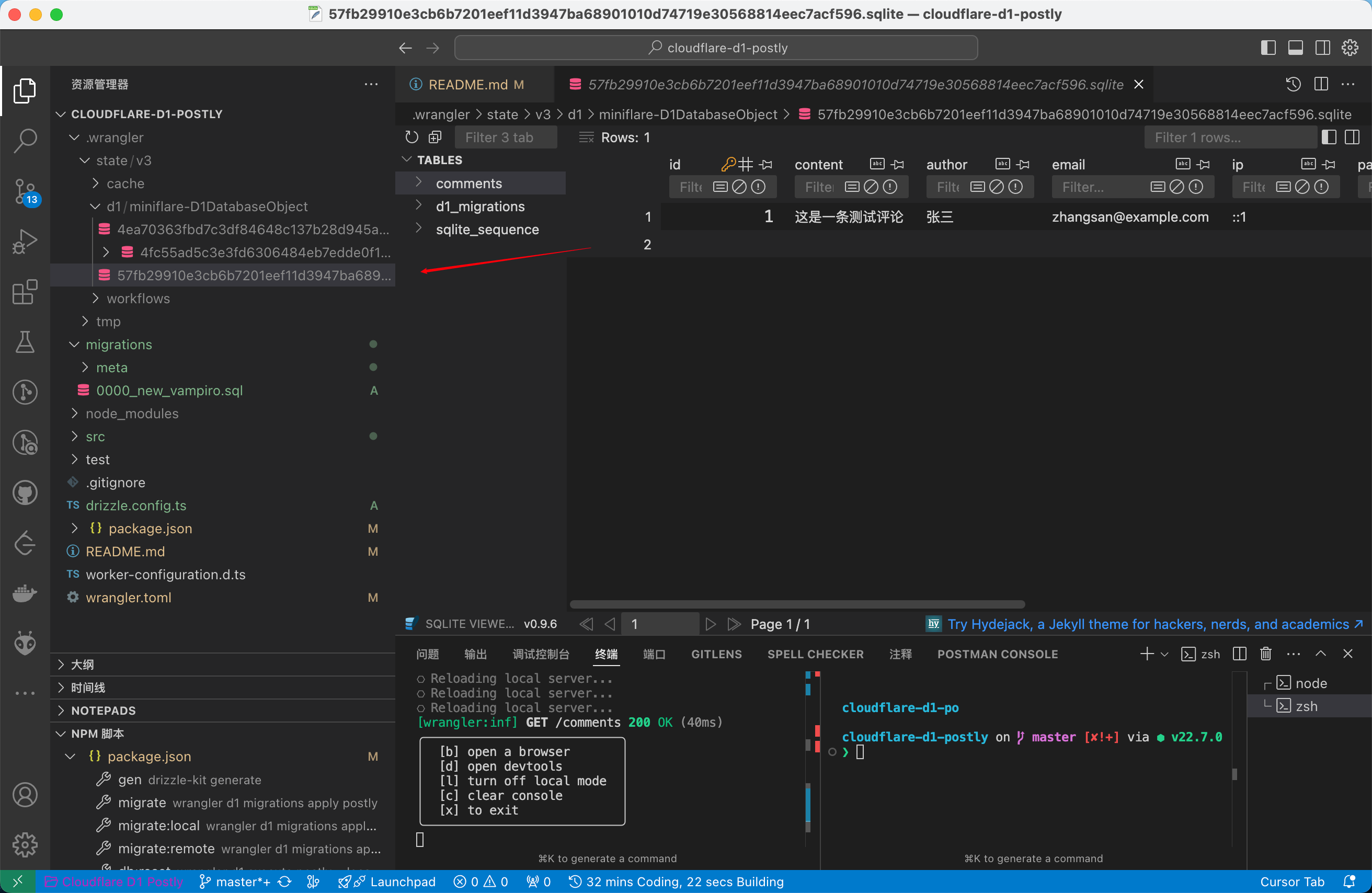
所以我们只是通过 sql 操作数据库,而并不是像 navicat 那样直接操作数据库。
也就是我们假如需要对 Cloudflare D1 数据库进行修改,可以直接通过 wrangler d1 命令行执行,但最好使用 Drizzle ORM 来操作。
技术栈
- Hono - 轻量级的 Web 框架
- Cloudflare D1 - 边缘 SQLite 数据库
- Drizzle ORM - TypeScript ORM
项目结构
├── .wrangler/ # wrangler 配置和 DB 文件
├── .migrations/ # 数据库迁移文件
├── src/
│ ├── db/
│ │ ├── index.ts # 数据库连接
│ │ └── schema.ts # 数据库模型
│ └── index.ts # API 路由
├── migrations/ # 数据库迁移文件
├── drizzle.config.ts # Drizzle 配置
└── wrangler.toml # Wrangler 配置
功能
- 创建评论
- 获取评论列表(树状结构)
- 更新评论
- 删除评论
- 支持评论回复(嵌套评论)
建表
这里其实很简单,通过 Drizzle ORM 定义表结构就行了。
这里外键 parentId 是自引用,用于评论回复。
          import { sql } from "drizzle-orm";
import { integer, sqliteTable, text, AnySQLiteColumn } from "drizzle-orm/sqlite-core";

// 定义表结构
export const comments = sqliteTable('comments', {
    id: integer('id').primaryKey({ autoIncrement: true }),
    content: text('content').notNull(),
    author: text('author').notNull(),
    email: text('email').notNull(),
    ip: text('ip').notNull(),
    postId: text('post_id').notNull(),
    parentId: integer("parent_id").references((): AnySQLiteColumn => comments.id),
    likes: integer('likes').default(0).notNull(),
    createdAt: text('created_at')
        .default(sql`CURRENT_TIMESTAMP`)
        .notNull(),
    updatedAt: text('updated_at')
        .default(sql`CURRENT_TIMESTAMP`)
        .notNull(),
});

// 导出类型
export type Comment = typeof comments.$inferSelect;
export type NewComment = typeof comments.$inferInsert;
配置 Drizzle 和 wrangler
这也没啥好说的,为什么这样配置,直接看官方文档就行了。
          import type { Config } from 'drizzle-kit';

export default {
    schema: './src/db/schema.ts',
    out: './migrations',
    driver: 'd1-http',
    dialect: 'sqlite',
} satisfies Config;
          #:schema node_modules/wrangler/config-schema.json
name = "comments-api"
main = "src/index.ts"
compatibility_date = "2024-01-15"

[observability]
enabled = true

[[d1_databases]]
binding = "DB"
database_name = "postly"
database_id = "your-database-id"
数据库连接
上面既然说了那么多 Drizzle ORM ,但是如何操作数据库的还不是很清楚。
- Wrangler 会自动将 D1 实例注入到 Worker 的环境变量中
- 在 Worker 中,使用 Hono.js 的 Bindings 来获取 D1 实例,就可以利用 Hono.js 实现路由分发
- 在 Hono.js 中,通过 Drizzle ORM 导出的方法,连接到数据库,那么久可以使用 Drizzle ORM 操作数据库了
          import { drizzle } from 'drizzle-orm/d1';
import * as schema from './schema';

export function createDb(d1: D1Database) {
    return drizzle(d1, { schema });
}

export type DbType = ReturnType<typeof createDb>;
worker
这里就没啥了, crud ,直接放代码了
          import { Hono } from 'hono';
import { createDb } from './db';
import { comments } from './db/schema';
import { eq } from 'drizzle-orm';
import type { Comment } from './db/schema';

const app = new Hono<{ Bindings: { DB: D1Database } }>();

interface CreateCommentBody {
    content: string;
    author: string;
    email: string;
    postId: string;
    parentId?: number;
}

// 创建评论
app.post('/comments', async (c) => {
    const db = createDb(c.env.DB);
    const body = await c.req.json<CreateCommentBody>();

    const ip = c.req.header('cf-connecting-ip') ||
        c.req.header('x-forwarded-for') ||
        'unknown';

    const newComment = await db.insert(comments).values({
        content: body.content,
        author: body.author,
        email: body.email,
        postId: body.postId,
        ip: ip,
        parentId: body.parentId || null,
    }).returning();

    return c.json(newComment[0]);
});

interface CommentWithReplies extends Comment {
    replies: CommentWithReplies[];
}

// 获取评论列表(树状结构)
app.get('/comments', async (c) => {
    const db = createDb(c.env.DB);

    const allComments = await db
        .select()
        .from(comments)
        .orderBy(comments.createdAt);

    // 构建评论树
    const commentMap = new Map<number, CommentWithReplies>();
    const rootComments: CommentWithReplies[] = [];

    allComments.forEach(comment => {
        commentMap.set(comment.id, { ...comment, replies: [] });
    });

    allComments.forEach(comment => {
        if (comment.parentId) {
            const parentComment = commentMap.get(comment.parentId);
            if (parentComment) {
                parentComment.replies.push(commentMap.get(comment.id)!);
            }
        } else {
            rootComments.push(commentMap.get(comment.id)!);
        }
    });

    return c.json(rootComments);
});

// 更新评论
app.patch('/comments/:id', async (c) => {
    const db = createDb(c.env.DB);
    const id = Number(c.req.param('id'));
    const { content } = await c.req.json<{ content: string }>();

    const updatedComment = await db.update(comments)
        .set({
            content,
            updatedAt: new Date().toISOString()
        })
        .where(eq(comments.id, id))
        .returning();

    return c.json((updatedComment)[0]);
});

// 删除评论
app.delete('/comments/:id', async (c) => {
    const db = createDb(c.env.DB);
    const id = Number(c.req.param('id'));

    await db.delete(comments)
        .where(eq(comments.id, id));

    return c.json({ success: true });
});

// 获取特定文章的评论列表
app.get('/posts/:postId/comments', async (c) => {
    const db = createDb(c.env.DB);
    const postId = c.req.param('postId');

    const allComments = await db
        .select()
        .from(comments)
        .where(eq(comments.postId, postId))
        .orderBy(comments.createdAt);

    // 构建评论树
    const commentMap = new Map<number, CommentWithReplies>();
    const rootComments: CommentWithReplies[] = [];

    allComments.forEach(comment => {
        commentMap.set(comment.id, { ...comment, replies: [] });
    });

    allComments.forEach(comment => {
        if (comment.parentId) {
            const parentComment = commentMap.get(comment.parentId);
            if (parentComment) {
                parentComment.replies.push(commentMap.get(comment.id)!);
            }
        } else {
            rootComments.push(commentMap.get(comment.id)!);
        }
    });

    return c.json(rootComments);
});

export default app;
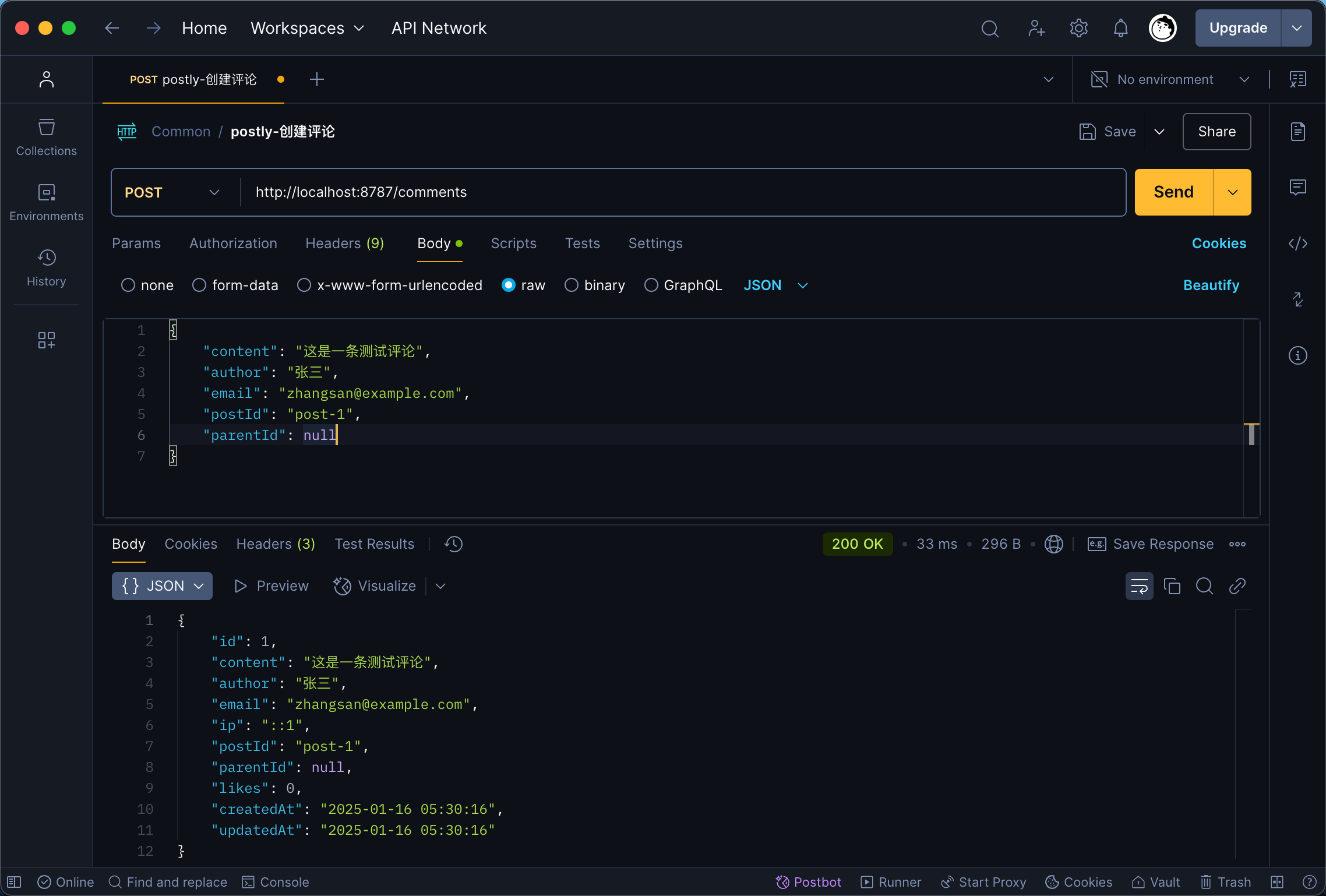
插入评论请求 body
          {
    "content": "这是一条测试评论",
    "author": "张三",
    "email": "[email protected]",
    "postId": "post-1",
    "parentId": null
}